
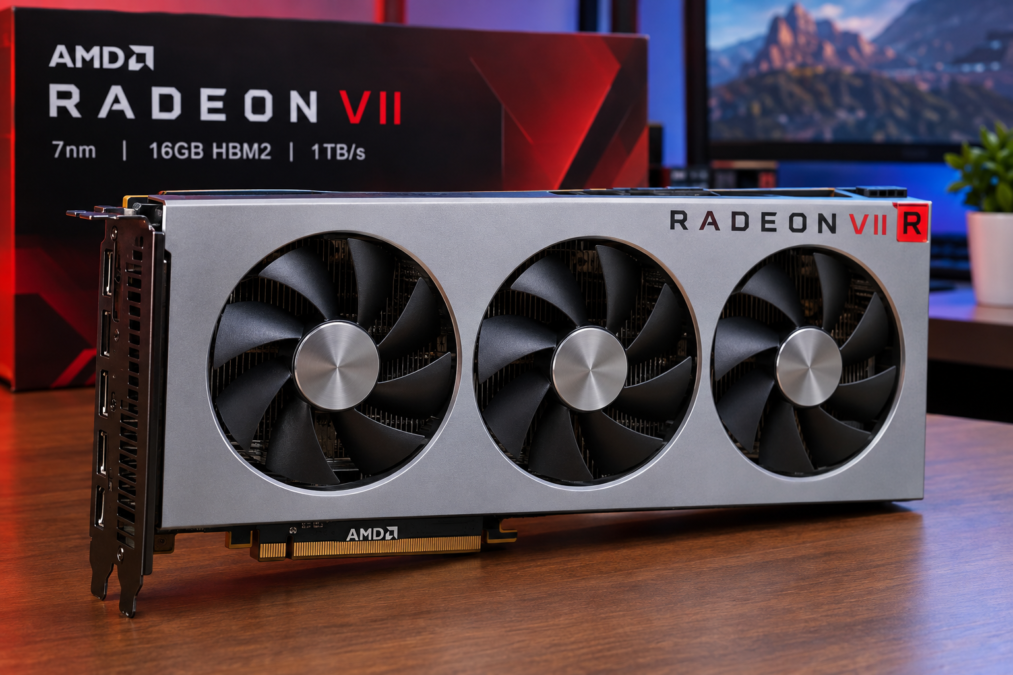

The amd radeon vii was one of the most interesting graphics cards released by AMD during the late 2010s. Introduced in 2019, it became notable because it was one of the first gaming-focused GPUs manufactured using a 7nm process. It also combined AMD’s Vega architecture with a huge 16GB of HBM2 memory and an impressive 1TB/s of memory bandwidth.
At a time when PC gamers were demanding higher resolutions, detailed textures, faster rendering, and better content-creation performance, the amd radeon vii arrived with specifications that looked impressive on paper. It was designed not only for gaming but also for creators, enthusiasts, and demanding graphics workloads.
Although newer GPU generations have since transformed the graphics-card market, Radeon VII remains an important part of AMD’s GPU history. Its technology helped demonstrate what a 7nm desktop graphics processor and extremely high-bandwidth HBM2 memory could achieve.
What Is the amd radeon vii?
The amd radeon vii is a high-end desktop graphics card based on AMD’s Vega 20 GPU. AMD launched it on February 7, 2019, with a launch price of $699. It used TSMC’s 7nm manufacturing process and included 3,840 stream processors across 60 compute units.
The name “VII” is commonly associated with the card’s use of 7nm technology. More importantly, the GPU represented a major evolution of the Vega family.
Unlike many graphics cards that focused primarily on gaming, Radeon VII had characteristics that made it attractive for workloads involving large amounts of graphics memory. Its 16GB of HBM2 memory was especially significant.
At launch, AMD positioned the card for:
- High-end PC gaming
- 1440p and 4K gaming
- Video editing
- 3D rendering
- Content creation
- Compute workloads
- Enthusiast PC systems
That broad purpose helped make the card unusual. It wasn’t simply about pushing game frame rates.
The Technology Behind the amd radeon vii
The amd radeon vii was built around AMD’s Vega 20 GPU. Vega 20 represented a smaller and more advanced manufacturing approach compared with the 14nm Vega 10 GPU used in products such as the Radeon RX Vega 64.
The move to 7nm allowed AMD to place a powerful GPU design into a relatively compact silicon area. AnandTech reported a 331mm² die containing approximately 13.2 billion transistors.
Here are some of the important specifications:
| Feature | amd radeon vii Specification |
|---|---|
| Architecture | Vega |
| GPU | Vega 20 |
| Manufacturing Process | TSMC 7nm |
| Compute Units | 60 |
| Stream Processors | 3,840 |
| Base Frequency | 1,400 MHz |
| Boost Frequency | Up to 1,750 MHz |
| Peak Single-Precision Performance | 13.8 TFLOPs |
| Memory | 16GB HBM2 |
| Memory Interface | 4096-bit |
| Memory Bandwidth | Up to 1TB/s |
| Typical Board Power | 300W |
| Recommended PSU | 750W |
| Launch Year | 2019 |
These specifications are listed by AMD on its current Radeon VII support page.
One thing immediately stands out: the memory system.
Why 16GB HBM2 Memory Mattered
Memory capacity can make a major difference in graphics-intensive applications. The amd radeon vii came with 16GB of HBM2, which was a large amount for a consumer graphics card in 2019.
Even more impressive was its memory bandwidth.
The card used a 4096-bit memory interface and could deliver up to 1TB/s of bandwidth.
To understand why this matters, imagine a busy highway. Memory capacity is somewhat like the size of the storage area, while memory bandwidth is like the number of lanes available for traffic. A larger highway can move more data quickly.
This was particularly useful for workloads involving:
- Large textures
- High-resolution video
- 3D scenes
- Professional visualization
- GPU compute
- Some content-creation applications
AMD specifically promoted the card’s large memory capacity and bandwidth for high-resolution textures and demanding creative workloads.
amd radeon vii and Gaming Performance
Gaming was a major part of the Radeon VII story.
When it launched, the card was aimed at the high-end gaming market. AMD compared it with its previous-generation Radeon RX Vega 64 and claimed improved gaming performance.
Independent testing showed that its performance varied depending on the game and resolution. In some titles, Radeon VII competed closely with high-end graphics cards from NVIDIA, while other games showed different results.
For example, AnandTech’s testing found that in Far Cry 5, Radeon VII, the GeForce GTX 1080 Ti, and GeForce RTX 2080 were broadly in the same performance range at 1440p and 4K, while results could change at lower resolutions.
That variation is important.
A graphics card doesn’t perform identically in every game because different game engines use hardware differently. CPU limitations, graphics APIs, driver optimization, resolution, and game settings can all affect results.
So, rather than looking at a single benchmark, it’s better to consider Radeon VII as a high-end 2019 GPU that could deliver strong performance across a broad selection of demanding games.
1440p Gaming With Radeon VII
For its generation, 1440p was an excellent target for the amd radeon vii.
At this resolution, the GPU had enough processing capability to handle demanding visual settings in many games. Its 16GB memory also provided plenty of room for large textures and other graphics data.
Gamers using a 1440p monitor could take advantage of:
- High or ultra graphics settings
- High-quality textures
- High refresh-rate displays in suitable games
- AMD FreeSync displays
- Modern DirectX 12 applications
- Vulkan-based games
Of course, actual performance depends heavily on the game and the rest of the PC.
A powerful GPU paired with an older or weaker processor might not reach its full potential. That’s why a balanced CPU, sufficient system memory, fast storage, and a capable power supply are important when building a high-performance PC.
4K Gaming and High-Resolution Graphics
The amd radeon vii was particularly interesting for high-resolution gaming.
4K gaming places much more pressure on a graphics processor because the GPU must render significantly more pixels than at 1080p. Memory bandwidth also becomes increasingly important as graphics workloads become heavier.
Radeon VII’s 1TB/s memory bandwidth gave it a strong specification advantage for this kind of workload. AMD also promoted its ability to handle high-resolution textures and demanding visual experiences.
Still, 4K gaming doesn’t automatically mean every game will run at maximum settings with extremely high frame rates. Performance varies from title to title.
That’s a useful lesson for anyone evaluating an older graphics card: specifications provide valuable clues, but real-world benchmarks remain important.
Content Creation and Professional Work
Gaming wasn’t the only reason AMD developed the Radeon VII.
The company also targeted creators who worked with demanding applications. AMD reported performance improvements over the RX Vega 64 in workloads such as Blender, DaVinci Resolve, and the LuxMark compute benchmark.
For creators, having 16GB of HBM2 could be particularly useful.
Video editors, 3D artists, and other professionals sometimes work with projects that require large amounts of memory. When a project becomes more complex, GPU memory can become an important resource.
Potential workloads included:
- 3D rendering
- Video editing
- Color correction
- Visual effects
- Computer-aided creative work
- GPU-accelerated applications
- Scientific and compute workloads
This helped give Radeon VII an identity that was somewhat different from a conventional gaming GPU.
amd radeon vii for Compute Workloads
The Vega architecture was known for strong compute capabilities, and Vega 20 continued that direction.
The amd radeon vii offered 13.8 TFLOPs of peak single-precision performance and 27.7 TFLOPs of peak half-precision performance according to AMD’s specifications.
Independent testing also examined the card’s compute performance across several workloads.
This made Radeon VII interesting to technically minded users who wanted a GPU that could do more than render game graphics.
However, there’s an important distinction between a consumer Radeon VII and professional Radeon products. Professional cards can provide different driver features, certifications, and reliability options for specialized applications.
For example, AMD’s later Radeon Pro VII offered ECC memory and professional software features that were different from the consumer Radeon VII.
Cooling and Power Requirements
The amd radeon vii was a powerful card, and power consumption reflected that.
AMD lists the card’s typical board power at 300W and recommends a 750W power supply.
That’s something buyers shouldn’t overlook.
A graphics card isn’t an isolated component. It operates as part of a complete system, so the power supply needs to provide enough capacity and appropriate connectors.
Radeon VII used an open-air triple-fan cooler in AMD’s reference design. This was a change from the blower-style cooling used on previous Vega cards.
However, independent testing found that the Radeon VII could become relatively loud under demanding workloads because of its aggressive fan behavior.
In simple terms, the cooler had to work hard to manage the heat generated by a powerful 300W-class GPU.
Build Quality and Physical Design
The reference amd radeon vii had a distinctive appearance. Its triple-fan cooling system gave it a strong high-end look, while the card’s metal construction made it feel like a premium enthusiast product.
The physical design was also important because high-end GPUs can take up substantial space inside a PC.
Before installing one, users should check:
- GPU length
- Available expansion slots
- Power supply capacity
- Power connectors
- Case airflow
- CPU cooler clearance
- Motherboard compatibility
A good airflow setup can help keep a high-power graphics card operating comfortably.
Driver Support and Software
Graphics-card performance depends on more than hardware. Drivers play a major role as well.
AMD continues to provide a Radeon VII driver page, and AMD’s current support information lists Windows 11 64-bit support along with Linux driver availability.
The card supports several graphics technologies and APIs, including:
- DirectX 12
- Vulkan
- OpenGL
- OpenCL
- AMD FreeSync
- Radeon Chill
- Radeon ReLive
- Virtual Super Resolution
Driver development can also improve compatibility with newer software. Still, users considering a much older GPU should check the latest official driver information before purchasing, particularly if they plan to use a recent operating system or specialized application.
amd radeon vii Compared With Radeon RX Vega 64
The amd radeon vii was essentially the next major step beyond Radeon RX Vega 64 in AMD’s high-end consumer Vega family.
The differences were significant.
| Feature | Radeon VII | RX Vega 64 |
|---|---|---|
| GPU | Vega 20 | Vega 10 |
| Process | 7nm | 14nm |
| Stream Processors | 3,840 | 4,096 |
| Compute Units | 60 | 64 |
| VRAM | 16GB HBM2 | 8GB HBM2 |
| Memory Interface | 4096-bit | 2048-bit |
| Memory Bandwidth | 1TB/s | About 484GB/s |
| Base Clock | 1400MHz | 1247MHz |
| Boost Clock | Up to 1750MHz | 1546MHz |
| Board Power | 300W | 295W |
The comparison reveals something interesting: Radeon VII had fewer compute units than Vega 64, but it offered higher clocks, a newer manufacturing process, twice the memory capacity, and more than twice the memory bandwidth.
That combination helped Radeon VII achieve its high-end positioning.
Strengths of the amd radeon vii
The amd radeon vii had several features that made it special for its generation.
Huge Memory Capacity
Its 16GB HBM2 memory was one of its biggest advantages.
Exceptional Memory Bandwidth
Up to 1TB/s was an extraordinary bandwidth figure for a consumer graphics card at the time.
7nm Manufacturing
The card demonstrated AMD’s move toward more advanced GPU manufacturing processes.
Strong Compute Potential
Its Vega 20 architecture was capable of substantial compute performance.
High-End Gaming
The card could compete in the high-end gaming segment when it launched.
Creator-Friendly Hardware
Large memory capacity and bandwidth could be useful in demanding creative workloads.
Limitations to Consider
No graphics card is perfect, and the amd radeon vii had several limitations.
First, it was a high-power GPU. Its 300W typical board power meant that system builders needed an appropriate power supply and good airflow.
Second, its launch price of $699 placed it firmly in the premium category.
Third, the card belonged to the Vega generation rather than AMD’s later RDNA families. As GPU technology progressed, newer architectures brought improvements in efficiency, feature support, and performance.
Finally, the reference cooler could produce noticeable fan noise under heavy loads, according to independent testing.
These points don’t erase the card’s strengths, but they help put its capabilities into proper context.
Who Was the amd radeon vii Designed For?
The amd radeon vii was especially suitable for users who wanted a powerful graphics card with a large amount of high-speed memory.
Potential users included:
- Enthusiast PC gamers
- 4K gaming enthusiasts
- Video editors
- 3D creators
- GPU compute users
- Graphics professionals
- Hardware collectors
- AMD technology enthusiasts
For someone building a modern PC today, however, the decision requires more careful consideration. Newer graphics cards can provide newer architectures, improved efficiency, and additional features that weren’t available when Radeon VII launched.
The Importance of Radeon VII in AMD’s GPU History
The amd radeon vii deserves attention because it represented an important transition period for AMD.
It showed that AMD could bring 7nm technology into a high-end consumer graphics product. AMD later moved toward its RDNA architecture for gaming GPUs. AMD itself noted the introduction of RDNA and the Radeon RX 5700 series in 2019, following Radeon VII’s launch.
In that sense, Radeon VII sits at an interesting point in AMD’s history.
It came after the Vega generation and shortly before the broader RDNA era. Its design also demonstrated how technologies developed for professional and compute-focused hardware could influence consumer products.
Is the amd radeon vii Still Interesting?
Yes, especially from a technology and historical perspective.
The amd radeon vii isn’t a modern graphics architecture, but its specifications remain fascinating. A 7nm GPU with 16GB HBM2 and 1TB/s memory bandwidth was remarkable for 2019.
For people interested in older hardware, the card can also provide a useful way to understand the development of modern GPUs.
However, anyone considering buying an old Radeon VII should evaluate the complete system and the intended workload rather than focusing only on its impressive memory specifications.
Important factors include:
- Used-card condition
- Price
- Power consumption
- Cooling
- Driver compatibility
- Gaming requirements
- Software compatibility
- Availability of newer alternatives
In other words, the specifications tell only part of the story.
Final Thoughts on amd radeon vii
The amd radeon vii was an ambitious high-end graphics card that combined AMD’s Vega architecture with 7nm manufacturing, 16GB of HBM2 memory, and up to 1TB/s of memory bandwidth.
Its launch in 2019 marked an important moment for AMD’s consumer GPU development. It offered strong high-end gaming performance while also bringing unusual levels of memory capacity and bandwidth to a consumer-focused graphics card.
Its 300W power rating and relatively demanding cooling requirements showed that high performance came with trade-offs.
Still, the amd radeon vii remains a memorable product because it combined gaming, creator, and compute capabilities in a single card. Its 7nm Vega 20 GPU, 3,840 stream processors, 16GB HBM2 memory, and 1TB/s bandwidth made it one of the most distinctive graphics cards of its generation. For anyone studying the development of AMD graphics technology, the amd radeon vii remains an important and fascinating chapter in the company’s GPU history.
amd radeon vii for Modern Gaming
The amd radeon vii may be an older graphics card, but its hardware can still make it interesting to PC enthusiasts. When looking at its gaming ability today, though, it’s important to separate its raw specifications from the features offered by newer GPU generations.
The card was built primarily around traditional rasterized graphics. This means it can still handle many games that rely on conventional rendering techniques. At 1440p, its performance can remain useful in suitable titles, while 4K gaming can place a much heavier load on the GPU.
Game settings also make a major difference. Reducing options such as shadows, reflections, and certain post-processing effects can improve frame rates considerably.
For older or well-optimized games, the amd radeon vii can still provide a smooth experience when paired with a capable processor.
Memory Makes the amd radeon vii Unusual
One of the most memorable aspects of the amd radeon vii is its 16GB of HBM2 memory.
Many graphics cards from its era came with considerably less VRAM. Radeon VII’s large memory pool gave it plenty of room for demanding textures and graphics data.
This can be useful when working with:
- High-resolution textures
- Large 3D scenes
- High-resolution video projects
- GPU compute workloads
- Complex visual effects
- Large creative projects
However, having more VRAM doesn’t automatically make a GPU faster. The graphics processor still needs enough computing power to process the workload.
That’s why Radeon VII’s memory capacity should be considered one part of its overall design rather than the only measure of performance.
Understanding HBM2 Technology
HBM2 stands for High Bandwidth Memory 2. Unlike conventional GDDR memory modules positioned around the GPU, HBM uses stacked memory technology placed close to the processor.
This design can provide extremely high memory bandwidth while using a very wide memory interface.
The amd radeon vii used four HBM2 stacks and a 4096-bit memory interface, allowing it to reach up to 1TB/s of bandwidth. (anandtech.com)
That’s an eye-catching specification even today.
The advantage of this architecture becomes clearer in workloads that constantly move large amounts of data between the GPU and memory. High bandwidth can help keep the graphics processor supplied with data.
amd radeon vii for Video Editing
Video editing is another area where Radeon VII’s large memory capacity can be useful.
Editors working with high-resolution footage may benefit from a GPU with plenty of memory, especially when projects include multiple layers, effects, transitions, color adjustments, and other demanding elements.
The actual experience depends on the editing software and how well it supports AMD’s GPU acceleration.
A video editor might use a GPU for:
- Timeline playback
- Effects processing
- Color correction
- Rendering
- Encoding
- Visual effects
AMD specifically promoted Radeon VII for creative applications when it launched, highlighting performance in workloads such as DaVinci Resolve and Blender. (ir.amd.com)
So, while it was marketed as a gaming product, its capabilities extended beyond gaming.
amd radeon vii and 3D Rendering
Three-dimensional rendering can place enormous demands on a graphics processor.
Artists may work with models containing millions of polygons, detailed textures, lighting effects, shadows, and complex scenes. A large amount of graphics memory can become useful when scenes grow in complexity.
The amd radeon vii was capable of contributing to GPU-accelerated rendering workloads. AMD’s launch material included Blender among the applications used in performance comparisons. (ir.amd.com)
Still, rendering performance depends heavily on the specific renderer and software support.
A GPU that performs well in one application might not perform identically in another. That’s why professional users should check application-specific benchmarks before choosing hardware.
Power Consumption and Efficiency
The amd radeon vii was manufactured using a 7nm process, which was an important technological step for AMD. Yet the card still had a typical board power of 300W. (amd.com)
This demonstrates an important point about GPU technology.
A smaller manufacturing process doesn’t automatically mean a graphics card will consume very little power. Manufacturers can use a more advanced process to fit more transistors and increase performance.
Radeon VII packed approximately 13.2 billion transistors into its Vega 20 GPU. (anandtech.com)
That helped provide substantial computing capability, but the card still generated significant heat.
Cooling the amd radeon vii
Good cooling is especially important for a high-power graphics card.
The reference amd radeon vii used three fans to move air through its cooler. During demanding workloads, the fans could become clearly audible.
A well-ventilated case can help by allowing cool air to enter and warm air to leave efficiently.
A practical setup should include:
- Front or bottom intake fans
- Rear or top exhaust fans
- Enough space around the graphics card
- Clean dust filters
- Proper cable management
- A suitable CPU cooler
Dust can also reduce cooling performance over time. If someone owns an older Radeon VII, keeping the system clean is especially important.
Connectivity and Display Support
The amd radeon vii was designed for high-resolution displays and multi-monitor setups.
AMD’s specifications list support for DisplayPort 1.4 with HDR and HDMI 2.0b. The card could support multiple displays, making it useful for productivity as well as gaming. (amd.com)
A multi-monitor configuration can be particularly useful for creators.
For example, a user could have:
- A main monitor for editing
- A second display for timelines or tools
- A third display for previews or reference material
Of course, the exact display configuration depends on the ports and adapters being used.
AMD FreeSync and Smooth Gaming
The amd radeon vii supported AMD FreeSync technology.
FreeSync is designed to synchronize the monitor’s refresh rate with the GPU’s frame output. This can reduce visual problems such as screen tearing and can make gameplay feel smoother.
For gamers with compatible monitors, this feature can be useful.
The broader lesson is that gaming performance isn’t only about frames per second. Monitor refresh rate, response time, adaptive synchronization, and frame consistency can all affect how a game feels.
A system producing a stable frame rate can sometimes feel better than one producing a higher but inconsistent frame rate.
Software Features of Radeon VII
AMD provided Radeon Software features that extended beyond basic graphics drivers.
Depending on the software version and operating system, Radeon users could access features designed for gaming, recording, streaming, display management, and performance monitoring.
Examples included:
- Radeon ReLive
- Radeon Chill
- Radeon Image sharpening
- FreeSync support
- Performance monitoring
- WattMan tuning
Software features can change over time as drivers are updated, so users should always consult AMD’s current documentation rather than assuming that every historical feature works exactly the same way today.
Overclocking the amd radeon vii
Enthusiasts often experiment with GPU settings to find additional performance.
The amd radeon vii offered options for adjusting clocks, voltage, memory settings, and fan behavior through AMD’s software tools.
However, overclocking isn’t risk-free.
Higher clock speeds can increase:
- Power consumption
- Heat output
- Fan noise
- System instability
A stable overclock requires careful testing.
Instead of immediately applying aggressive settings, enthusiasts generally benefit from making small adjustments and checking stability after each change.
For an older card, this becomes even more important because the hardware may have already experienced years of use.
Used amd radeon vii: What Buyers Should Check
Because Radeon VII is no longer a current-generation product, someone buying one today will most likely be considering a used card.
That means physical condition matters.
Before purchasing a used amd radeon vii, buyers should check:
- Fan condition
- Visible dust buildup
- Signs of overheating
- PCB condition
- Power connectors
- Display outputs
- Reported temperatures
- Stability under load
- Previous mining use, if disclosed
- Warranty availability
A benchmark screenshot alone isn’t enough.
A card might complete a short benchmark but become unstable after extended use. If possible, testing the card under sustained workload can provide more useful information.
Mining and the Radeon VII
Radeon VII also attracted attention from cryptocurrency-mining enthusiasts because of its large memory bandwidth and strong compute characteristics.
This matters in the used market because graphics cards used for intensive mining may have experienced long periods of high workload.
That doesn’t mean every previously mined card is defective. A well-maintained card can continue working for years. However, buyers should understand the history of used hardware whenever possible.
Checking fan condition and temperature behavior is particularly useful.
How Long Can an amd radeon vii Last?
There isn’t a single fixed lifespan for a graphics card.
A well-maintained GPU can remain operational for many years, while another unit can develop problems sooner.
Factors that influence longevity include:
- Operating temperature
- Dust levels
- Fan condition
- Power quality
- Usage patterns
- Overclocking
- Environmental conditions
- Component aging
The amd radeon vii was built as a premium graphics card, so its physical quality was aimed at enthusiast systems. Nevertheless, age is now an important factor when evaluating one.
amd radeon vii vs Modern GPUs
Comparing Radeon VII with modern GPUs isn’t completely straightforward.
Newer graphics cards benefit from architectural improvements that go beyond raw clock speeds or memory capacity.
Modern GPUs may offer improvements in:
- Power efficiency
- Ray tracing
- AI acceleration
- Video encoding
- Upscaling technologies
- Frame-generation technologies
- Driver features
- Media engines
The amd radeon vii was designed before many of these technologies became central to modern gaming.
This means a newer GPU with less VRAM can sometimes provide a better gaming experience than Radeon VII despite Radeon VII having an impressive 16GB memory capacity.
That’s a good reminder that more memory isn’t always equal to more performance.
Why Radeon VII Remains Historically Important
The amd radeon vii is significant because it represents an important stage in AMD’s transition toward newer GPU technologies.
It demonstrated the practical use of 7nm manufacturing in a high-end consumer GPU and combined this process technology with the Vega architecture.
Shortly afterward, AMD’s RDNA architecture became the foundation for its next major generation of gaming GPUs.
In this way, Radeon VII can be viewed as a bridge between AMD’s Vega era and the company’s future gaming architecture.
For technology enthusiasts, that makes the card more than just an old GPU.
Frequently Asked Questions About amd radeon vii
Is amd radeon vii still good for gaming?
The amd radeon vii can still run many games, particularly when settings and resolution are chosen appropriately. However, newer GPUs generally provide newer features, improved efficiency, and more modern architectural capabilities.
How much VRAM does Radeon VII have?
Radeon VII has 16GB of HBM2 memory. AMD lists a 4096-bit memory interface and up to 1TB/s of memory bandwidth. (amd.com)
Does Radeon VII support 4K?
Yes. Radeon VII was designed as a high-end GPU capable of handling 4K gaming and other high-resolution workloads, although actual frame rates depend on the game, settings, and system configuration.
How much power does Radeon VII use?
AMD lists a typical board power of 300W and recommends a 750W power supply. (amd.com)
Is Radeon VII based on RDNA?
No. Radeon VII is based on AMD’s Vega architecture, specifically the Vega 20 GPU. AMD introduced its RDNA architecture later with the Radeon RX 5700 family.
Why is Radeon VII famous?
It is remembered for combining a 7nm GPU, 16GB of HBM2 memory, 1TB/s memory bandwidth, and high-end gaming and compute performance in a consumer graphics card.
Final Thoughts on amd radeon vii
The amd radeon vii remains one of AMD’s most distinctive enthusiast graphics cards. Its 7nm Vega 20 GPU, 16GB HBM2 memory, 4096-bit interface, and 1TB/s memory bandwidth made it an unusual and technically ambitious product for its time.
Although newer graphics architectures have introduced many improvements, Radeon VII still provides valuable insight into how GPU technology evolved. Its large memory capacity, strong compute capabilities, and high bandwidth show why it attracted gamers, creators, and hardware enthusiasts.
For anyone studying AMD’s graphics history, the amd radeon vii is a fascinating example of a GPU that pushed manufacturing technology and memory bandwidth forward while helping mark the transition toward the next generation of AMD graphics architecture.
Explore more insightful articles on All Vantage News and never miss an update.Contact Us.