
Apple continues to improve the iPhone experience with each major software update, and iOS 27 brings some of its most ambitious changes yet. The new release puts a strong focus on artificial intelligence, a more capable Siri, privacy, family safety, photography, Safari, performance, and everyday productivity.
Apple introduced iOS 27 during WWDC26 on June 8, 2026. The update includes the next generation of Apple Intelligence, a redesigned and more capable Siri AI experience, new child-safety tools, and a wide range of improvements across the operating system. Apple says the software is designed to make iPhone experiences more responsive, useful, and personal.
For people wondering what makes iOS 27 different, the answer is simple: Apple is making intelligence a much bigger part of the iPhone experience. Instead of treating AI as a separate feature, the company is bringing it into apps and everyday tasks.
Note: Apple’s availability pages currently show regional differences in the rollout date, so users should check the software-update screen on their iPhone for availability in their region.
What Is iOS 27?
iOS 27 is Apple’s major operating system update for compatible iPhone models. It follows the company’s yearly software-update cycle and introduces new features while also improving existing apps and system functions.
At first glance, it might look like another regular iPhone update. However, there’s more going on under the hood. Apple has placed considerable attention on artificial intelligence and on-device capabilities.
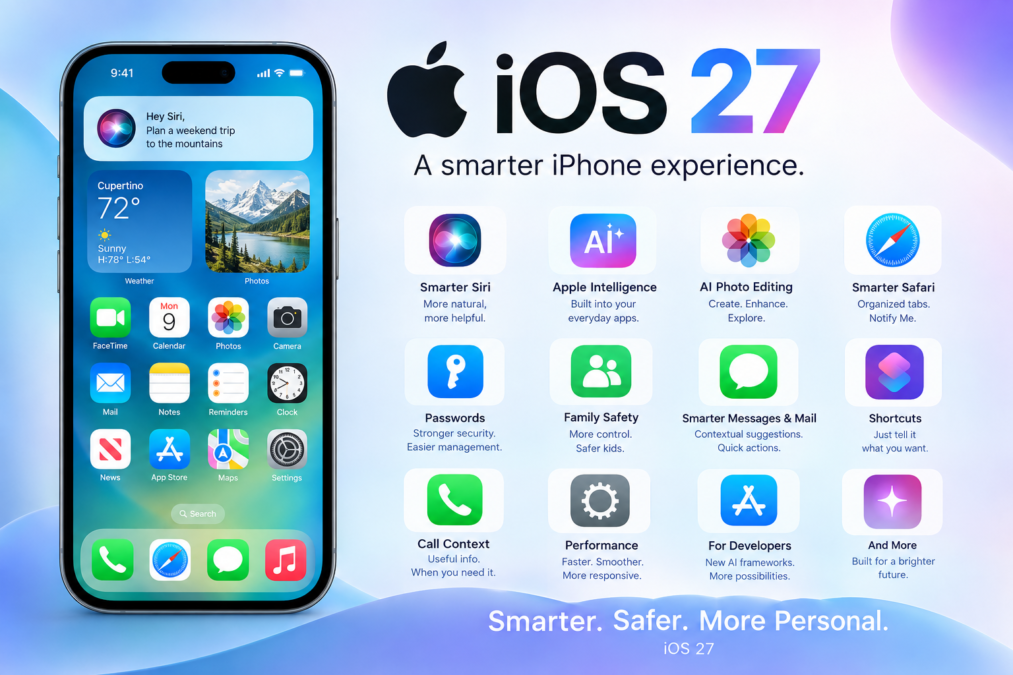
Some of the major areas of iOS 27 include:
- A new Siri AI experience
- Expanded Apple Intelligence
- AI-powered photo editing
- Smarter Safari features
- Improved Passwords functionality
- New child-safety tools
- More useful Suggestions
- Smarter Shortcuts
- Call Context
- Performance and design improvements
- New tools for developers
Apple has also introduced new AI frameworks that allow developers to build more intelligent applications while taking advantage of Apple hardware and privacy technologies.
iOS 27 and the New Siri AI Experience
One of the biggest stories surrounding iOS 27 is Siri AI.
Apple is taking Siri beyond the traditional voice-assistant model. The company describes the new Siri AI as more knowledgeable, capable, and useful, with the ability to understand natural language more effectively.
With the new experience, users can interact with Siri in a more conversational way. Rather than memorizing specific commands, you can describe what you want in ordinary language.
For example, you might ask Siri to:
- Help plan an activity
- Provide information
- Work with information from apps
- Help write or edit content
- Answer questions in a more conversational way
- Assist with everyday tasks
Apple has also shown a dedicated Siri AI experience where users can revisit conversations and continue interacting with the assistant.
That’s a significant shift. Siri isn’t simply being given a new look; Apple is attempting to make it more useful as an intelligent assistant.
However, users should keep one important detail in mind: some Siri AI capabilities are rolling out later and may depend on language, region, and compatible hardware. Apple says Siri AI is initially rolling out in English, with broader language support planned.
Apple Intelligence Becomes More Important in iOS 27
Artificial intelligence is arguably the central theme of iOS 27.
Apple Intelligence is being expanded across multiple parts of the iPhone experience. Instead of requiring users to open a separate AI application, Apple is placing intelligent functions directly inside familiar tools.
This approach can make AI feel less complicated.
For instance, users can benefit from AI while:
- Writing messages
- Working with emails
- Editing photographs
- Browsing websites
- Creating images
- Using Shortcuts
- Managing passwords
- Searching for information
Apple has also introduced developer technologies that make it possible for apps to interact more naturally with Apple’s intelligence capabilities.
This could become especially interesting as developers create new applications that take advantage of the tools.
On-Device AI and Privacy
Privacy remains an important part of Apple’s AI strategy.
Apple has introduced frameworks that allow developers to run AI models on supported Apple hardware. The company says its Core AI framework is designed to run models on-device, reducing dependence on servers for certain tasks.
That matters because AI often involves personal information. When processing can happen directly on a device, there can be advantages for privacy, speed, and responsiveness.
Of course, not every AI task can necessarily run locally. Some advanced features may use server-based processing, and Apple has indicated that certain AI features have usage limits because they depend on powerful server models.
iOS 27 Brings Smarter Photo Features
Photography has always been an important part of the iPhone experience, and iOS 27 adds more intelligent tools for working with images.
Apple highlights AI-powered photo editing features such as Spatial Reframing and an upgraded Clean Up experience. These tools are designed to help users change or improve images without requiring advanced editing knowledge.
That could be particularly useful for everyday users.
Imagine taking a photograph and later deciding that the composition isn’t quite right. Instead of opening a complicated editing application, intelligent tools can help adjust the image more naturally.
Apple is also expanding image-generation capabilities through Image Playground.
Users can create different types of visual content and experiment with AI-powered image creation. It’s a fun example of how artificial intelligence is becoming part of normal smartphone use.
iOS 27 Makes Safari More Intelligent
Safari receives several useful improvements in iOS 27.
One notable change is automatic organization of tabs into topics. When people have dozens of open tabs, finding the right page can become a headache. Topic-based organization is intended to make this process easier.
Safari also gains a feature called Notify Me.
The basic idea is straightforward: Safari can monitor certain web pages for changes and alert users when something important happens.
For example, it can be useful when monitoring:
- A product price
- Product availability
- A restock
- Changes to a webpage
This can save users from repeatedly checking the same website.
It may seem like a small improvement, but little conveniences like this can make a phone feel much smarter in everyday life.
iOS 27 Improves Password Management
Online security is another important area of iOS 27.
Apple’s Passwords app can identify weak or compromised passwords and help users improve account security. Apple says the app can also update eligible compromised passwords with a tap, although some aspects of this capability are marked as coming in a future software update.
This is useful because many people still reuse passwords or continue using old credentials after a security problem.
A password manager can make security easier by helping users:
- Identify weak passwords
- Find compromised credentials
- Improve account security
- Manage passwords in one place
Security tools aren’t always exciting, but they can be among the most valuable features on a smartphone.
iOS 27 Introduces New Child-Safety Features
Family safety is another major focus of iOS 27.
Apple announced new tools intended to help parents create safer digital experiences for children. These features can provide parents with more control over how young users interact with apps and online content.
The goal isn’t simply to restrict access. Instead, Apple is trying to give families more practical controls for managing digital experiences.
This can be especially helpful as children increasingly use smartphones for:
- Communication
- Education
- Entertainment
- Games
- Social interaction
- Online research
Parents can benefit from clearer tools that make it easier to understand and manage a child’s digital activity.
Smarter Suggestions in Messages and Mail
Everyday communication gets an AI boost in iOS 27.
Messages and Mail can offer suggestions based on the context of a conversation. These suggestions can help users take quick actions without manually switching between different applications.
For example, if someone sends information that relates to a reminder or calendar event, the system can suggest an appropriate action.
This is where AI can become genuinely useful.
Rather than showing off with complicated technology, the software quietly helps the user get things done.
And honestly, that’s often the best kind of technology.
Call Context Helps During Phone Calls
Another interesting feature in iOS 27 is Call Context.
Apple says Call Context can surface relevant information from across apps while you’re talking to a business. For example, information stored in Mail could appear when you’re speaking with an airline.
This could reduce the need to search through apps while keeping a conversation going.
Instead of thinking, “Wait a second, let me find that confirmation email,” the relevant information may be presented when needed.
It’s a good example of Apple trying to make the iPhone more context-aware.
iOS 27 Makes Shortcuts More Accessible
Shortcuts can also benefit from Apple Intelligence.
Apple says users can describe what they want a shortcut to do in natural language. The system can then connect actions across different apps to automate a task.
This is particularly interesting for people who want automation but don’t want to learn complicated workflows.
For example, a person could describe a routine such as:
- Send someone a message when leaving work
- Include an estimated arrival time
- Perform several actions automatically
The concept is simple: tell the iPhone what you want instead of manually building every step.
That could make automation much more approachable for ordinary users.
iOS 27 Compatibility and Apple Intelligence Devices
Not every iPhone supports every Apple Intelligence feature.
Apple says Apple Intelligence and Siri AI in iOS 27 require compatible hardware. Supported devices include iPhone 16 models and later, as well as the iPhone 15 Pro and iPhone 15 Pro Max.
This distinction is important because installing iOS 27 and having access to every AI feature aren’t necessarily the same thing.
Here’s a simple overview:
| Feature Area | iOS 27 Improvement |
|---|---|
| Siri | More capable Siri AI |
| AI | Expanded Apple Intelligence |
| Photos | AI editing and image creation |
| Safari | Topic-based tab organization and Notify Me |
| Passwords | Better security assistance |
| Messages | Context-based suggestions |
| Smarter actions and writing support | |
| Calls | Call Context |
| Shortcuts | Natural-language automation |
| Family | New child-safety controls |
| Performance | System-wide improvements |
Feature availability can vary by device, language, and region, so users should check Apple’s official compatibility information before assuming a particular AI feature will work on their iPhone.
iOS 27 for Developers
The changes in iOS 27 aren’t only about what users see on the screen.
Apple has introduced new tools for developers, including the Foundation Models framework and Core AI. These frameworks allow developers to build AI-powered applications using Apple technologies.
The Foundation Models framework provides developers with access to Apple’s on-device language model through Swift APIs. Apple also supports multimodal prompts, allowing apps to work with text and images in certain AI experiences.
This could open the door to a new generation of iPhone applications.
Developers can potentially create apps that:
- Understand natural-language requests
- Process images
- Run AI models on supported hardware
- Use AI-powered app actions
- Build more personalized experiences
- Connect app functionality with Siri
Apple has also expanded App Intents so that app content and actions can become more accessible through natural-language interaction with Siri.
Performance and Design Improvements in iOS 27
Artificial intelligence may get most of the attention, but iOS 27 also includes broader improvements to the operating system.
Apple says it has worked on areas including memory usage, search, display rendering, CPU utilization, and the overall responsiveness of the system.
The operating system also continues Apple’s refreshed design direction, with changes intended to make the interface feel consistent across Apple platforms.
For everyday users, these improvements can matter just as much as headline features.
A phone doesn’t need to perform a flashy AI trick every day. It needs to:
- Open apps quickly
- Respond smoothly
- Search efficiently
- Manage memory well
- Display content properly
- Remain reliable
That’s where system optimization earns its keep.
iOS 27 Availability and Release Information
Apple announced iOS 27 at WWDC26 on June 8, 2026. Developer testing began at that time, while Apple planned a public beta and a broader software release later in the year.
Apple’s current regional pages show the release beginning in September 2026, although the exact displayed date can differ by regional Apple website.
Before installing any major software update, it’s sensible to:
- Back up your iPhone
- Make sure you have enough free storage
- Connect to Wi-Fi
- Keep the battery charged
- Check whether your device supports desired features
- Review important app compatibility
Beta versions should generally be treated differently from stable releases because beta software can contain bugs and unfinished features.
What Makes iOS 27 Different?
There are many reasons iOS 27 stands out.
Earlier iOS updates often focused heavily on individual applications or interface improvements. This release takes a broader approach by making intelligence part of multiple everyday experiences.
Consider how many areas can now interact with AI:
- Siri
- Photos
- Safari
- Messages
- Passwords
- Shortcuts
- Calls
- Image Playground
That wider integration is important.
Instead of thinking about AI as one isolated feature, Apple is building an ecosystem where intelligent tools can appear naturally throughout the iPhone.
Benefits and Possible Limitations of iOS 27
Like any major software update, iOS 27 has both advantages and limitations.
Major Benefits
- More capable AI assistance
- Better natural-language interaction
- Smarter photo tools
- Improved Safari organization
- More convenient password security
- Better automation
- New family safety tools
- More intelligent app interactions
- Developer-focused AI frameworks
- Continued attention to privacy
Things to Keep in Mind
- Some AI features require newer iPhones.
- Availability can vary by country or language.
- Some features may arrive later than the main software release.
- Certain AI features can have usage limits.
- Siri AI availability may initially be limited by language or region.
- Users shouldn’t assume every advertised feature works on every iPhone.
Apple specifically notes that some features may not be available in all languages or regions, and local laws and regulations can affect availability.
Is iOS 27 Worth Updating To?
For most compatible iPhone users, iOS 27 is an important update because it combines new AI features with improvements to familiar parts of the operating system.
People with newer iPhones that support Apple Intelligence have the most to gain. They can use advanced Siri AI features, intelligent photo tools, enhanced automation, and other AI-powered functions.
However, users with older compatible devices may not receive the complete Apple Intelligence experience.
The best approach is to look at the features that actually matter to you.
If you care about:
- AI assistants
- Photography
- Privacy
- Productivity
- Security
- Safari
- Automation
- Family controls
then iOS 27 offers plenty to explore.
Final Thoughts on iOS 27
iOS 27 represents an important step in Apple’s continuing development of the iPhone. Its biggest change isn’t simply a new interface or one exciting application. Instead, Apple is weaving artificial intelligence into many parts of the operating system.
The new Siri AI experience is especially significant, while Apple Intelligence expands into photos, Safari, Messages, Mail, Passwords, Shortcuts, and other areas. At the same time, Apple is giving developers new tools to create AI-powered applications and giving families more ways to manage children’s digital experiences.
There are still practical limitations. Device compatibility, language support, regional availability, and phased feature releases all matter. Still, the overall direction is clear.
iOS 27 is designed to make the iPhone more intelligent, more helpful, and more connected to the way people actually use their devices. As Apple and developers continue expanding these capabilities, iOS 27 could become one of the company’s most important software releases for the modern AI-powered iPhone experience.
iOS 27 and the Everyday iPhone Experience
The real value of iOS 27 isn’t only found in its headline features. Instead, many of its improvements are designed to make ordinary iPhone tasks easier, faster, and more natural. From communicating with friends to finding information online, Apple is bringing more intelligence into the places people already use every day.
This approach is important because good software shouldn’t make users work harder. It should quietly help them get things done.
With iOS 27, Apple is moving toward an iPhone experience where the system can better understand what users are trying to accomplish. Whether you’re organizing information, editing a photo, browsing the web, or creating a shortcut, the operating system can provide more helpful tools along the way.
iOS 27 and Better Communication
Communication remains one of the most common reasons people use their iPhones. iOS 27 introduces improvements that can make conversations more useful and efficient.
Messages and Mail can use context to provide suggestions and actions. Instead of forcing users to manually copy information from one application to another, the system can recognize useful details and offer relevant options.
For example, a conversation might contain information about:
- A meeting
- A travel plan
- An appointment
- A reminder
- A website
- A location
- A task that needs to be completed
The ability to recognize context can reduce unnecessary steps.
After all, nobody wants to jump between five different apps just to complete one simple task.
A More Context-Aware iPhone
One of the interesting directions in iOS 27 is context awareness.
Traditional smartphone software generally waits for a user to open an application and request something. A more intelligent operating system can understand what information might be useful at a particular moment.
This doesn’t mean the iPhone should constantly make decisions for you. Instead, the goal is to provide helpful suggestions while keeping the user in control.
This approach can be useful when:
- Reading emails
- Making phone calls
- Browsing websites
- Working with photographs
- Creating reminders
- Using Siri
- Automating tasks
The result can be a more natural interaction between the user and the device.
iOS 27 and Siri’s Future
Siri has been part of the iPhone experience for many years, but artificial intelligence is changing what people expect from digital assistants.
With iOS 27, Apple is giving Siri a much more advanced AI direction. Users can interact with Siri using more natural language instead of relying on rigid commands.
For example, people don’t necessarily have to remember a specific phrase. They can explain what they need in a conversational manner.
This is especially useful for people who aren’t comfortable with complicated technology.
A smarter Siri could eventually become a central control point for the iPhone, allowing users to interact with applications and information through ordinary conversation.
Natural Language Makes Technology Easier
Natural language is one of the most important developments in modern AI.
In the past, users often had to learn how software worked before they could use it effectively. With AI-powered systems, the technology can increasingly understand the way people naturally communicate.
iOS 27 takes advantage of this idea through Siri, Shortcuts, and Apple’s developer frameworks.
Instead of thinking:
“Which button do I need to press?”
a user can increasingly think:
“What do I want my iPhone to do?”
That small change can make technology much more accessible.
iOS 27 and Photography
The iPhone has become one of the most popular cameras in the world, so improvements to photography naturally receive significant attention.
iOS 27 adds intelligent tools that can help users modify photographs with less effort.
AI-powered editing can be especially helpful for people who don’t have professional photography skills.
A user might want to:
- Remove an unwanted object
- Improve the framing
- Change the composition
- Create a different visual effect
- Generate new images
- Adjust an existing photograph
Traditional editing can require several steps and sometimes a separate application. Intelligent editing tools can simplify the process.
AI Photo Editing for Beginners
One major advantage of AI-powered photo editing is simplicity.
Professional image editors can be extremely powerful, but they can also be confusing. Beginners may not know which tool to choose or which setting to change.
With iOS 27, intelligent editing aims to make certain tasks more straightforward.
For example, rather than manually selecting an unwanted object pixel by pixel, an AI-based tool can help identify and remove it.
That doesn’t mean professional editing software is becoming unnecessary. Instead, it gives ordinary users more options without requiring advanced skills.
iOS 27 and Image Creation
Image generation is another growing part of Apple’s AI ecosystem.
Tools such as Image Playground allow users to experiment with generated visual content. This can be useful for entertainment, creative projects, personal messages, and simple visual ideas.
Students, bloggers, social media creators, and everyday users may find these features particularly interesting.
For example, a person could use AI-generated images for:
- Personal projects
- Digital invitations
- Creative ideas
- Educational material
- Social posts
- Messages
- Simple illustrations
The technology is still developing, but it shows how smartphones are becoming creative tools rather than simply communication devices.
iOS 27 and Safari
Safari is another area where iOS 27 attempts to make browsing more convenient.
People often open many browser tabs while researching something. Over time, these tabs can become difficult to manage.
Topic-based tab organization can help users find related pages more easily.
Imagine researching a vacation and opening pages for:
- Hotels
- Flights
- Restaurants
- Attractions
- Maps
- Travel guides
Instead of having one enormous collection of unrelated tabs, organization by topic can make browsing easier.
It’s a small feature on paper, but it can make a noticeable difference in daily use.
Safari’s Notify Me Feature
Another useful Safari addition is Notify Me.
The idea is particularly helpful for users who regularly monitor websites for changes.
For example, someone might be waiting for:
- A product to return to stock
- A price to change
- A webpage to update
- New information to appear
Rather than repeatedly refreshing the page, users can receive an alert when the relevant change occurs.
This is a good example of technology doing the boring work in the background.
iOS 27 and Online Security
Security is becoming more important every year as people store more personal information on their phones.
An iPhone may contain:
- Email accounts
- Banking information
- Passwords
- Personal photographs
- Messages
- Work documents
- Social media accounts
- Shopping information
Because so much valuable information is stored on a smartphone, strong security features are essential.
iOS 27 continues Apple’s focus on password management and account protection.
Stronger Password Habits
Weak passwords can create serious security problems.
Many people use simple passwords because they’re easier to remember. Unfortunately, simple passwords can also be easier for attackers to guess.
The Passwords app in iOS 27 can help users identify security problems with stored credentials.
This can encourage better habits, including:
- Using unique passwords
- Replacing weak credentials
- Monitoring compromised passwords
- Keeping login information organized
A password manager might not sound exciting, but it can be one of the most useful tools on a modern smartphone.
iOS 27 and Family Safety
Children are spending more time online, which makes parental controls increasingly important.
iOS 27 introduces additional tools designed to help parents manage children’s digital experiences.
Parents may want to control or understand:
- Which apps children can use
- What online content they can access
- How they communicate
- Which features are available to them
- How they interact with digital services
The purpose of these tools isn’t simply to block everything.
Instead, the goal is to help families establish healthier and safer technology habits.
Why Privacy Matters in iOS 27
Privacy has become one of Apple’s major technology themes.
AI creates new privacy questions because intelligent systems may process personal information. iOS 27 attempts to address some of these concerns through Apple’s on-device AI technologies.
When processing can happen directly on the device, information doesn’t always need to be sent to a remote server.
This can provide several potential benefits:
- Better privacy
- Faster responses
- Reduced dependence on internet connections
- More control over personal information
However, not every AI task can necessarily be performed on-device. More complex operations may require server-side processing.
The important point is that Apple is building privacy considerations into the architecture of its AI systems.
iOS 27 for Students
Students can benefit from many of the productivity improvements included in iOS 27.
A modern iPhone can already be used for studying, communication, research, and organization. AI tools can make these activities more efficient.
For example, students may use their iPhones to:
- Organize tasks
- Set reminders
- Research subjects
- Communicate with classmates
- Create notes
- Work with images
- Automate repetitive actions
Natural-language tools may also reduce the learning curve for students who aren’t familiar with advanced automation.
Instead of manually creating a complex workflow, they may be able to describe the task they want to complete.
iOS 27 for Content Creators
Content creators are another group that could benefit from iOS 27.
Many creators already use iPhones to take photographs, record videos, communicate with audiences, and manage social platforms.
AI-powered tools can potentially speed up parts of the creative process.
Useful areas include:
- Image creation
- Photo editing
- Writing assistance
- Organization
- Automation
- Research
- Communication
For bloggers and digital publishers, this can make an iPhone feel more like a compact creative workstation.
iOS 27 and Developers
The developer side of iOS 27 may eventually be just as important as the features users see today.
Apple’s AI frameworks give developers new ways to integrate intelligence into their applications.
This means the impact of iOS 27 could expand over time.
A software update may launch with a certain number of AI features, but developers can create thousands of additional experiences afterward.
Potential applications could include:
- AI-powered productivity apps
- Smarter educational tools
- Intelligent photo applications
- Personal organization apps
- Creative software
- Accessibility tools
- Business applications
In other words, the biggest changes may not all be visible on day one.
The Role of Apple’s Hardware
Software and hardware work closely together.
AI features can require substantial processing power, memory, and specialized hardware. That’s one reason why some iOS 27 intelligence features are limited to newer iPhone models.
Apple’s newer chips are designed to handle demanding computational workloads more efficiently.
This creates a familiar technology cycle:
New hardware → more processing power → more advanced software → new user experiences
As iPhone hardware becomes more powerful, developers can potentially create increasingly sophisticated applications.
iOS 27 and Battery Considerations
Major software updates can sometimes affect battery behavior temporarily.
After installing iOS 27, the iPhone may perform background tasks such as indexing files, organizing information, or completing system processes.
As a result, some users may notice increased battery activity shortly after updating.
This doesn’t necessarily mean the update is permanently damaging battery life.
It’s generally sensible to give the device some time after a major update and monitor battery performance under normal usage.
Battery life can also depend on:
- Device age
- Battery health
- Screen brightness
- Mobile network conditions
- App activity
- Background processes
- Location services
- Usage patterns
So, one person’s experience may differ from another’s.
Should Older iPhone Users Upgrade?
For users with compatible devices, installing iOS 27 can provide access to security improvements, system enhancements, and new functionality.
However, the experience may vary depending on the model.
Older compatible iPhones may not support all the newest AI features.
Therefore, users should separate two questions:
Can my iPhone install iOS 27?
and
Can my iPhone use all of the major iOS 27 features?
These aren’t necessarily the same thing.
iOS 27 Feature Availability Can Vary
One important point about iOS 27 is that features aren’t necessarily available everywhere at the same time.
Availability can depend on:
- iPhone model
- Language
- Country or region
- Local regulations
- Apple account settings
- Feature rollout schedules
Some capabilities may also be introduced gradually.
Therefore, users shouldn’t be surprised if a feature discussed online isn’t immediately visible on their device.
Checking Apple’s official software documentation is the safest way to confirm availability.
A Quick Comparison of Key iOS 27 Areas
| Area | What iOS 27 Brings | Main Benefit |
|---|---|---|
| Siri | More advanced AI experience | Natural interaction |
| Photos | Intelligent editing | Easier image improvement |
| Safari | Better organization and monitoring | More convenient browsing |
| Passwords | Security assistance | Safer accounts |
| Messages | Contextual suggestions | Faster communication |
| Intelligent actions | Better productivity | |
| Shortcuts | Natural-language creation | Easier automation |
| Calls | Call Context | Useful information during calls |
| Family | Child-safety tools | Better parental control |
| Developers | AI frameworks | More powerful apps |
What Users Should Expect From Future iOS Updates
iOS 27 could be viewed as part of a larger transition rather than an isolated software release.
Artificial intelligence is becoming increasingly integrated into operating systems. Future updates may continue this trend with better personalization, more capable assistants, improved automation, and deeper connections between applications.
The most interesting possibility is that the iPhone may become better at understanding a user’s intent.
Instead of simply responding to commands, future software could increasingly understand the context surrounding those commands.
That could make smartphones feel less like collections of separate apps and more like unified personal assistants.
Final Thoughts on iOS 27
iOS 27 is more than a collection of small improvements. It represents Apple’s broader move toward an intelligent iPhone experience in which AI, privacy, productivity, communication, photography, browsing, and automation work more closely together.
The biggest attraction is undoubtedly the expansion of Apple Intelligence and the new Siri AI experience. Yet the quieter improvements matter too. Better Safari organization, smarter password management, family safety tools, contextual suggestions, AI-powered photography, and natural-language Shortcuts can all improve everyday use.
Of course, not every feature will be available on every iPhone or in every region. Some capabilities require newer hardware, while others may arrive through later updates. That’s something users should keep in mind before judging the entire operating system.
Still, the overall direction is promising. iOS 27 shows Apple’s intention to make the iPhone more helpful without making it unnecessarily complicated. As developers build new applications around Apple’s AI frameworks, the possibilities could become even broader.
For users interested in artificial intelligence, privacy, productivity, photography, and smarter mobile technology, iOS 27 is an update worth watching closely. Ultimately, the success of iOS 27 will depend not only on the features Apple introduces, but also on how naturally those features improve the way people use their iPhones every day.
Explore more insightful articles on All Vantage News and never miss an update.Contact Us.